Tuesday, March 26, 2013

EDLD 5326 Schools and Communities

 
This week's assignment was to create a plan and presentation to increase community involvement in our school(s).
 
My office is currently envolved in just such a task and I have had the opportuntiy to work closely with schools to improve our CTE programs.  This presentation is one that can be made available to all schools or published on our website.  I intentionally did not use my district name, because at this time, I do not have authorization from my director.  It is one of our goals to increase parent, student, teacher, community and industry partners for our programs.


Sunday, March 17, 2013

Reflections of Web Conference - EDLD 5326

EDLD 5326 - School /Community Relations

Weekly Web conferences
I really enjoy the web conferences because it give the class a "real" feeling and give me an opportunity to hear others experiences with their course work.  This is my 10th class and I feel confident about the course work and the professors expectations.  As I listen to students that are new to the program, I reminisce about my own insecurities this time last year.

 I benefit from the questions and dialog that happens during the conference. I have been unable to make the last two weekend meetings, however, I watch the recordings.

There is one aspect our course of study that I miss, we do not collaborate on our assignments. I learned a lot about myself and my team mates and I feel we would benefit for more collaboration in the other classes. I am still in communication with my team, and we connect in other social networks.

I am looking forward to our walking together in August for graduation.

If you are interested in why I was unable to attend the last two web conferences, I have been midwife to my caprine herd and have been on goat maternity watch all week.  All were successful births and we have 5 new babies. Mini-me, Calypso, Gissel, Prince William and Prince Harry. 


10 days later!!
Goatopia !!
And they are still a distraction...but also a stress reliever !  If you like animals and need a laugh, watch them play !

Sunday, October 28, 2012

Action Research Plan Update

This weeks assignment provided me an opportunity to reflect on my research and begin the process of reporting the results.  The project will utilize data over a 3 year period, starting in May 2010 and concluding in May 2013.  The draft of my Action Research Report an be found on my wiki page, Wiki My Education.

https://sites.google.com/site/wikimyeducation/


Sunday, August 19, 2012

Reflections from Digital Media EDLD 5366

Our team created a collaborative website using C.R.A.P. design concepts.
It can be viewed from this link.  Team Digital Techs 

This course introduced new terminology to me. The concepts were not new; I have been using design concepts in my current position as a Career and Technical Education program manager.  In addition, I utilized design principles in my past position as a classroom teacher (photo-journalism, web development, yearbook sponsor, computer applications and graphic design).  I took classes in college, taught design practices in the classroom, and utilized it in my personal business.  However, I have never heard it referred to as C.R.A.P.  I found this acronym very amusing and will use it often with my co-workers and when mentoring teachers that need some help with the concept.

One of our assigned readings for this course was “How crap is your site design?” by M. Rundle.  I really enjoyed this author’s personality as it came through his writings.   “We learned that good design is based on the C.R.A.P. principles where C.R.A.P. stands for Contrast Repetition Alignment Proximity, and when Creative Directors tell you that your design is crap, they’re actually giving you positive reinforcement.”   I think students and teachers will enjoy this play on words. I could envision this word as a ‘hook’ to gain the interest of hard to reach high school students. A note of caution, some may take offense or misunderstand the acronym.  The explanation should appear simultaneously when using it as a catchy title of an assignment.
For some, the concept seems to be intuitive and the efficient placement of information on a flyer, web page or other graphic project is  easy.  For others, the end product appears to be result of the lack of planning. Their design has too much information and it is difficult to determine interest.  Many times poorly designed web pages or flyers will cause viewers to “move on” because there is too much information to determine its value. Another possible outcome of no C.R.A.P., the viewer may have interest, but limited time, or attention span, to find the important information.  Educators teaching or using graphic design can easily remember the C.R.A.P. acronym and put the technique to good use when utilizing or teaching the basic design concepts. (I would add that using C.R.A.P. concepts would be helpful in some email correspondence.)

Wiki pages or other web based pages can be used for distance learning or blended learning environments.  Teachers post their assignments on their web page.  Students that are absent can see new assignments, read announcements and comment or ask questions.  This could also be used in an extended absence situation where a student is prevented from attending classes for medical or behavior problems.  Teacher's web pages are an excellent communication tool for parents, homework is clearly stated and assignment due dates are posted.  Parents can keep tabs on their students’ homework and due dates, on demand, anytime of day or night. In addition, classes can collaborate with students within the district or around the country.  Their work can be posted for feedback and brainstorming ideas for projects and problem solving.

Another useful tool when designing a class website project, or any classroom activity, is reflection and feedback.  We should step away from the project and look at the page with a fresh outlook and self reflect. Or ask a colleague to review and be open to an honest critique.  In an article, Feedback that fits, S. Brookhart offered some wise advice, “To craft teacher feedback that leads to learning, put yourself in the student's shoes.” She expanded the comment by saying, “But feedback is only effective when it translates into a clear, positive message that students can hear.”

Reflection and feedback can also be used by students in the classroom to analysis their own learning.  Educators can begin at an early age introducing the concept of reflection and feedback in the elementary classes.  The “Think, Pair, Share” activity is good for every age of learner, from kindergarten to career professionals.  Educational leaders and teachers use reflection as a tool for planning, staffing decisions, scheduling, discipline; every activity of their school day or event.  By reflecting on the past or planning for a future event, we can avoid many conflicts and crisis.  Educators can teach elementary age students to use reflection with simple open ended questioning techniques and graduate to the pairing and sharing, as they begin to master self reflection.

 On a website, “Exploring the Environment”, T. Herbert was quoted as saying, “The teacher must also be able to vary his or her approach in helping the students analyze what has taken place. The methods are dependent on the personalities and situations involved.”
Every learning environment has its unique situations, depending on the learners and participants.  A good educational leader takes time to know their audience and tailor self reflection and feedback activities to foster a safe learning environment.  This was evident to me as I worked with my classmates on our website for this class.  I was forced from my control comfort zone and into a collaborative environment.  I was fortunate in that I had team members that created that safe environment to express conflicting ideas and move to a consensus in a non threatening manner.  Occasionally, we have to work on a projects where we may not feel safe.  This is not conducive to a collaborative project because it causes some to have too much input and some to have too little.

As an example, I would like to tell a personal experience. I recently participated in training where a group of 20 district leaders (administrators and curriculum specialist) were in asked to participate in a desert plane crash situation.  Everyone with any information, as to location, died in the crash.  We were given a list of items that were salvaged from the plane. As a group, we had to decide our course of action, what to use and how to use it.  In addition, we were to rank the items in order of importance.  Trained observers were in the room taking notes on our problem solving techniques.

 I had some experience in survival training, as my son was an Eagle Scout and he (with my help) earned the survival badge.  After a few of my suggestions were shot down by an aggressive principal, I stopped making suggestions. After the all groups made their rescue plans, we reconvened as a large group (5 plane crashes) to compare our plans to those of an expert on desert survival.  The outcome of these group collaborations was interesting.  Let me say, most of the plane crash survivors, did not survive their rescue plans.  (A word of warning, when lost in the desert, facing dehydration, if someone tells you to take salt tablets and you obey, you will die before being rescued.)

The results of the impartial observer, showed many of the rules of collaboration were broken; some with good ideas were never heard, and those with bad ideas, but were outspoken, lead the group into disaster.  I liked the activity and will use it in the future when conducting collaboration training, with students or adults.

The skills we acquired or improved during the course of this class will improve my effectiveness as an educational leader.  As I reflect on the events, I have learned the importance of listening more and talking less, as well as, being open to other viewpoints. It is important to recognize that everyone has a voice in the decision and the outcome, even if you agree to disagree, it’s important to find the middle ground.  It is important for us to remember the one important factor in all our efforts; it’s not about the teacher, it’s about the students.


Rundle, M, How C.R.A.P is Your Site Design?, April 2006, retrieved from http://thinkvitamin.com/design/how-crap-is-your-site-design/

Brookhart, S. M., Feedback that fits, (Dec 2007/Jan 2008), Volume 65, Number 4
Informative Assessment, Pages 54-59, retrieved from http://www.ascd.org/publications/educational-leadership/dec07/vol65/num04/Feedback-That-Fits.aspx

Herbert, T., (1995), Experiential learning: A teacher's perspective, retrieved from http://www.cotf.edu/ete/teacher/reflect.html

Sunday, August 12, 2012

TEAM DIGITAL TECHS

We have just completed week 4 of Digital Media 5366. This was another collaborative project that I participated as a team member with "Team Digital Techs". The team members are Tanya Henslee from Austin, Ericka Turner from Beaumont, Randy Clements from Killeen Mary Angel from Austin. You can view our web sites by following the link to TEAM DIGITAL TECHS.

Saturday, July 21, 2012

Evidence of the use of Design Principles in ancient manuscripts


“Bible from Ethiopia, Commissioned by Emperor Iyasu in around 1700.

By examining the ancient works of authors in the 1700, one can see that they recognized and followed many of the same principles of design that we observe today in modern digital graphics.  The manuscript used to demonstrate these similarities is,  “Bible from Ethiopia, Commissioned by Emperor Iyasu in around 1700.

By viewing pages 2 and 3, one will notice the use of an illustration on the left page and some writing on the right page.  The writing is in Hebrew, however, some of the text is in red ink and some is in black.  If we compare to our modern day bible, we can assume the red text is important and is set out from the majority of the other words.  This demonstrates the use of the first design principle, Contrast.

As we look at these pages and following pages, you will see that Repetition is demonstrated in the use of images to illustrate acts, and the use of graphics to surround the text on the following pages.  These graphics are different, but share repeated designs using columns, leaves, trees, birds and arches.

Alignment is shown by keeping the text evenly spread between the “cells” of the graphics containing text.  No indention or spacing is used in the text.

Proximity can be assumed (unless one could read Hebrew).  The drawings of people on the one page relate to the text that is in reference to the action of the men. On following pages, the description of the page, further supports Proximity by describing what is found on both pages, “The left page contains the rest of Eusebius' Letter to Carpianus followed on the right by his first canon table, which sets out the parallels and variations in the Synoptic Gospels.”


Image of Ethiopic Bible Selections - Pages 2 and 3

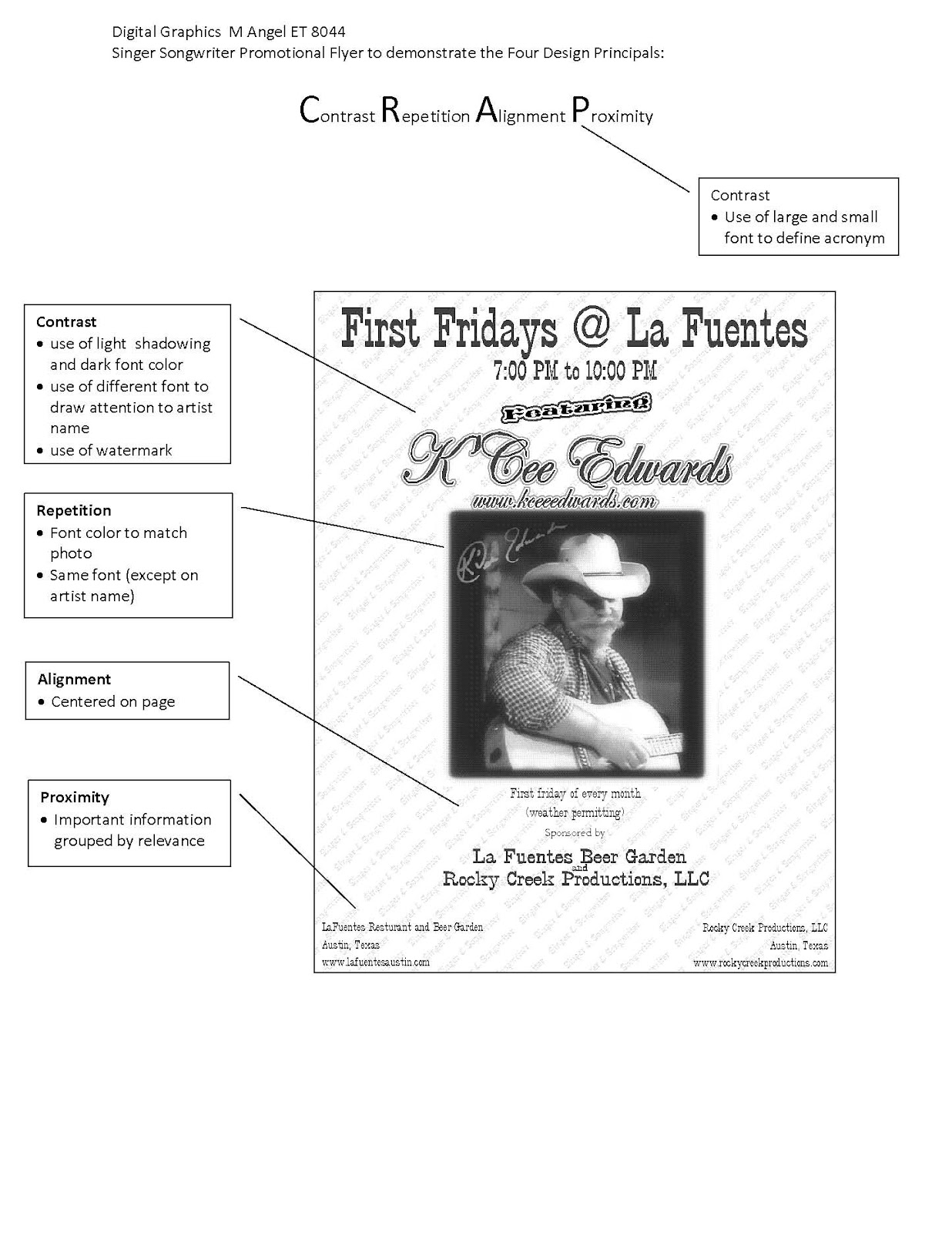
Digital Graphic 5366 - Four Design Principles teaching tool

This document can be used to teach or demonstrate the design principle in a classroom.


Friday, July 6, 2012

Action Research Plan - update as of July 6, 2012

I re-posted my original Action Research Plan from March 17, 2012 so the updates would be more meaningful to readers.
In our Course EDLD 5301 we were asked to formulate an Action Research project and work on it throughout our internship. Periodically, other classes ask that we report on our progress and document the work being done and what impact our plan may have on our campus or in our district.

I am very happy with the outcome of my work on district committees to improve the 8th grade Technology Proficiency in Austin ISD.  When I began my research, I discovered that less than half of all 8th grade students passed the proficiency test adopted by our district.  While looking for an explanation for these dismal results, I discovered that only about 60% of students even took the exam.

The details are included in my Action Research document, however, I will outline the work briefly.
Questions: What can the district do to increase the proficiency test scores of 8th grade students in AISD to meet the requirements of NCLB, the Texas Long Range Technology Plan, and AISD eRateTechnology Plan.
 by 2013
Evidence 1.4.1 - 100% of 5th and 8th grade students take the online TLA in May. 70% of students will receive a "proficient" score.


Austin ISD has 19 middle schools.
May 2011 - Results

  • approximately <60% of all 8th grade students were tested 
(2011-12 enrollment of 9th grades students compared to total number of students reported  test results.)
  • <50% were proficient
While dissecting the data, these questions were raised.


  • Why did some campuses successfully test the majority of their students and some campuses tested none of their students?
  • Why did some campuses only test 20- 50% of their students?
  • Why did <50% of the tested students pass the proficiency test?


I contacted several members of our technology support team and found that most had no idea why we were testing 8th grade students.  There was a large turnover of personal in that department and the lead person had left the district.
Once I provide key people with the actual details of our AISD tech plan, a committee was formed, I was invited to join, and we began meeting and formulating a plan for the 2012 testing period.

Our lead members from Instructional Technology, Josie Hughes and Deborah Rang led the charge by getting a document blessed by upper administration that was sent to all principals at the middle school campus.  This document outlined the importance of the testing and that is was not an "optional" test.
Counselors had been using the "busy" test for low performing students.

The 2012  preliminary results are very favorable and I will be analyzing the data later this summer.
However, the good news is that :

  • every campus administered the test
  • almost 75% of all students were tested
I expect that our proficiency rate increased as well. 

 Our committee will begin meeting earlier next year to implement a plan to use 5th grade student results to determine electives choices for students entering middle school.  
Recommendations from my Action Research Plan:
  • that a technology rich CTE course be mandatory for students not demonstrating 5th grade proficiency.
  • proficiency test administered in the fall and students not demonstrating proficiency be place in additional technology rich CTE course.

More details to follow.

Mary Angel - Lamar University Grad Student- Lifelong Learner: 8th grade Technology Proficiency - Action Research...

Mary Angel - Lamar University Grad Student- Lifelong Learner: 8th grade Technology Proficiency - Action Research...: Action Research Planning –   8 th  Grade Technology Proficiency Mary Angel – Education Technology Intern Goal:    What can Austin Inde...

Multimedia EDLD 5363 Week 5 Final Video

Our team includes Tanya Hensley (Austin,Tx), Randy Clements (Killeen, Tx), Ericka Turner (Beaumont, Tx) and myself, Mary Angel (Austin, Tx).  We have worked for 3 weeks to use online collaboration to produce a lesson video for our Multimedia Class.  We utilized Web 2.0 tools, such as Audacity, iMovie, Adobe Premier Elements, Dropbox, Google Docs, and Google Hangouts.  We joined web conferences with our professor and fellow classmates on Adobe Connect.  We were able to shoot, record, edit, review, re-shoot/record, plan, share and collaborate without ever meeting in person.  This was a very educational experience.


The final result of our efforts is posted on YouTube and can be seen at the following link:

"Scientific Method Made Easy"
http://youtu.be/GFW4jl6eQCg


Thursday, July 5, 2012

Multimedia class Web Conference Reflections

I have participated in at least four web conferences for this course, June 4, June 16, June 18, and June 30.  I have enjoyed the opportunity to see the other students in my classes. I am always please to see the students in my peer group, digital immigrants.  I benefit emotionally and educationally as we share our frustrations, successes and  how we have overcome the challenges. I receive validation when I hear that others are having some technical issues with the Web 2.0 tools we are using.

In my earlier reflection on web conferences, I remarked that some students are not paying attention in the conference.  I would like to repeat that today.  Fellow students, what makes the conferences productive is everyone using the active listening skills that we insist from our own students.

I have experienced, while conducting professional development, that teachers are the worst students.  And we are the worst role models when it comes to paying attention and participating.  There seems to be a shared mentality,  "Do as I say, not as I do".  I would suggest, that we work to change that in future classes and web conferences.  Technical problems aside, it is very disrespectful to waste the professor's time, as well as the other students, when they have to repeat themself or answer the same question multiple times.

I have concerns and we have not really addressed them in our conversations.  In my personal experiences, when downloading "free" or shareware, there are add-ons, tool bars, and unwanted programs attached to the download.  Another sneaky tactics used by some download sights, the "download" button is disguised or confusing and you can end up downloading programs that you did want or need. I have noticed a marked slowdown in my computer boot up and processing speed.  I need to take some time and go through my program files and delete some of the added programs. In our haste to complete assignments, I would just caution students (as they take these tools to the classroom) to be extremely careful with "free" downloads and remember the advice, "there are no free lunches".

Overall, the conferences are helpful, insightful and meaningful.  As technology improves and our behavior improves, web conferences will continue to make the online course taking experience a very valuable part of education.

Saturday, June 30, 2012

Group Project update

Our group has completed most of the task in Week 4.  Randy completed editing the video and posting in Dropbox.  He did a good job, but I was inspired to try to fill some of the dead air that occurred while we did our egg wraps and drops. In addition, we had not documented the use of audacity or other voice recording except for Randy and his voice-over corrections.
Ericka recorded in audacity a couple of lines, which I added in our 4.2 assignment, and put it in the Dropbox. I recorded myself as a narration in Adobe Premier Element software.
After splitting and placing appropriately in the video, I rendered it to an .avi file and named it Scientific Method Made Easy 3, as it took me a few attempts to finish the task.  I moved it into our shared folder and sent emails to my cohorts for approval.
If acceptable, we can load to Youtube tomorrow.
I feel as if I have grown as an educator and a leader in this project. Learning when to follow is a difficult lesson.

Web Conference 6-30-12

We had a large group of students on today's web conference.  I will venture a guess that many students were  "multitasking" during the conference.  Many questions were asked in the chat bar, that had already been answered by Dr. Abernathy.  It was as if, every student wanted the question answered directly to the individual student.  I would encourage students to give up the 30-45 minutes of their time to pay attention during the web conference.
Apparently, Dr. Abernathy was experiencing some technical difficulty today with the Adobe Connect software, and her web cam was not working.  However, for  the most part, audio was fine, and it was recorded.

Some student grumble about the web conferences, but I enjoy the 'one on one' experience, even if I do not participate in chat or ask questions.
Listening to the students and observing the professors' responses will help me grow in the area of distance learning.  I have aspirations of conducting distance learning courses in the future.  By observing as many of these conferences as I can, the experience will help me gain ideas of the "ideal" situations.

Wednesday, June 27, 2012

Update on group video project

    We have had some fun making the different parts of our video.  Each of us provided parts (short video or still shots) shared them in Dropbox.  We have meetings about 2 times a week on Google hangouts.  That is an awesome app.  If you haven't tried it, you should.  You can go to Google and sign in and then open Google +.  If you do a Google search, it will, of course take you right to it.
   Back to our project...it is interesting trying to collaborate on a 90 second finished product. But, it can be done.  We have an awesome number of Web 2.0 tools to help us work together.

Saturday, June 23, 2012

Multimedia Class EDLD 5363 Week 3 - Google Doc

Our group has meet 3 times on Google Hangouts this week.  We have made a lot of progress on our project.
When I copied and pasted our Google Doc (collaboration documentation)  into the assignment document, the graphics did not load into the table.  Therefore, I am including a link in this blog to the Google doc. Here you should be able to the process in its entirety.

Week 3 Documentation - Clements, Henslee, Turner, Angel

Saturday, June 16, 2012

Video Editing and Video Podcast

Creative Commons License
Create Video Lesson with TopViewSoft by Mary Angel is licensed under a Creative Commons Attribution-NonCommercial-ShareAlike 3.0 Unported License.


This assignment was a challenge. But one I have enjoyed and have learned many new tricks.  I am not completely convinced that what I created is exactly what was asked for, and I know I went over 2 minutes. However, I like the product and plan to share my experiences this week with my teachers and colleagues.  It is exactly what we have been needing. On demand training, with specific tasks for them to finish by deadlines. This was much easier that the PowerPoints I have created in the past with dozens of screen shots.

During this process, I have downloaded a million free software titles and had to create a spreadsheet to keep track of which program does which tasks.  And I hope I didn't download too many spyware in the process.

I am a little confused about the Creative Common bug that we are to add to our work.  Youtube has a the option to select the Creative Common Attribution license and to select the Educational Category.  Is that sufficient for uploading to their site?
So many questions, so little time!

Tuesday, June 12, 2012

Multimedia Podcast Assignment 2.1

Boy, this course is coming at us hard and fast.  It is a challenge to keep up with the assignments.  I used to consider myself pretty tech savvy, but there is still so much to learn and so little time to play.
However, this is fun.  Check this out on You Tube!

Sunday, June 10, 2012

A Digital Story

A Digital Story - Tech Time Travel with a Baby Boomer

Script for a digital story"Travel through tech time with a Baby Boomer"


Digital Story – Travel through tech time with a Baby Boomer
Slide 1 - It’s a brave new world…how did we get here?  Let’s travel back in time and I will tell you a story of my journey from the Land o’ Low Tech, through the land of Rising’ Tech and into the domain of NOW!
Slide 2- I was born to the post war era of 1946 – 1964. Our generation is called “the Baby Boomers”
Follow my migration across the great Technological Divide, be amazed (an amused) as I cross Generation X and Y and Generation Next and encounter their offspring, Generation Net.
Slide 5- My daddy had “car phone” in his truck.  The truck horn would honk when his boss was calling him!
Slide 6 - We had one phone in our house, but children were not allowed to use it
Slide 7 - We shared a phone line with 4 other families – a party line! 
Slide 13 - I did my first data input on one of these
Slide 15 - We had to learn a language called “DOS”
Slide 19 - There was a lot of money made by programmers and scammers alike! But we survived….and technology thrived.
Slide 21 -At our in service, there was not a computer in sight
But now….
Slide 22 - Technology….
Slide 23 - Is changing….
Slide 24- ….how we teach and learn!
Slide 25 - “What lies ahead for this Boomer? Stay tuned for the sequel, “The next 50 years”